
If you have built a brand name, logo, or tagline for your business, the next smart step is to protect it legally through trademark registration. A trademark is what separates your business identity from thousands of others in the market, and once it is registered, nobody else can legally copy your brand name, logo, or slogan.
A lot of people think trademark registration is a complicated, expensive, and lawyer-only process — but that’s not entirely true. In this blog, we will walk you through the complete step-by-step process of trademark registration in India, including the cost, who can apply, how to check if your brand name is already taken, what documents are needed for different types of businesses (proprietorship, partnership, LLP, private limited company), the role of DSC and MSME registration, and when exactly you get to use the ™ and ® symbols.
This guide is written for beginners — so even if you are applying for the very first time, you will be able to follow along without confusion.
What Is Trademark Registration and Why Does It Matter
A trademark is any word, name, logo, symbol, slogan, colour combination, or even a sound that helps customers identify your goods or services and distinguish them from competitors. Once you register a trademark under the Trade Marks Act, 1999, you become the legal owner of that mark for the categories (classes) you registered it in, and you get the exclusive right to use it across India.
Without registration, you can still use your brand name, but if someone else copies it, you will have a very hard time proving ownership and stopping them legally. With registration, you get a legal certificate that acts as proof of ownership, and you can take strict legal action — including sending legal notices and filing infringement suits — against anyone who copies your brand.
How Much Does Trademark Registration Cost in India?
This is usually the first question every applicant asks, so let’s clear this up right at the start.
The cost of trademark registration in India has two parts — the government fee (paid to the Trade Marks Registry) and the professional fee (if you hire a CA, CS, or trademark attorney to handle the filing for you).
Government Fee for Individuals, Startups, and MSMEs
If you are filing online (e-filing) and you fall under the category of an individual, sole proprietor, startup, or MSME (Micro, Small and Medium Enterprise), the government fee is ₹4,500 per class for each trademark application. This is the lowest fee slab, and it’s a big reason why individuals and small business owners are encouraged to register their MSME certificate before applying for a trademark — it directly reduces the cost.
Government Fee for Companies, LLPs, and Other Entities
For larger entities such as private limited companies, public limited companies, and other businesses that don’t qualify under the MSME or startup category, the government fee is ₹9,000 per class.
So, if your business operates in two different categories — say, manufacturing (Class 3 for cosmetics) and retail (Class 35 for selling those cosmetics) — and you are filing as a private limited company, your total government fee would be ₹9,000 x 2 = ₹18,000. The same filing as an individual or MSME would cost ₹4,500 x 2 = ₹9,000.
What If You File Offline (Physical Filing)?
Filing physically at the Trademark Registry office instead of online costs slightly more — usually around ₹500 extra per class compared to e-filing. Because of this price difference, and the convenience factor, almost everyone now prefers online filing.
Professional / Attorney Fees
On top of the government fee, if you hire a trademark attorney, CA, or filing agency to do the search, prepare the application, and file it on your behalf, they will charge a professional fee. This can range anywhere from a few hundred rupees to a few thousand rupees, depending on the firm and the complexity of your application (for example, if you need a detailed trademark search report before filing). This fee is completely separate from the government fee and is optional — you can also file it yourself if you’re comfortable with the portal.
Can an Individual Register a Trademark in India?
Yes, absolutely. One of the biggest misconceptions is that only registered companies can apply for a trademark. In reality, any person — including individuals, freelancers, sole proprietors, and unregistered businesses — can apply for trademark registration in their own name.
When an individual applies, they are listed as the “Proprietor” on Form TM-A, and once the trademark is registered, that individual becomes the registered owner with full legal rights over the mark. Many freelancers, YouTubers, consultants, and small shop owners register trademarks under their personal name before they even form a company, and later transfer or use the same trademark when they incorporate a business entity.
So if you’re a solo entrepreneur just starting out, you don’t need to wait until you register a company — you can apply for trademark registration in your individual name right away, and you’ll also be eligible for the lower ₹4,500 government fee.
Step 1: Check Whether the Trademark Name Is Already Registered (Trademark Search)
Before you spend any money on filing, the most important step is to check whether your desired brand name, logo, or tagline is already registered or applied for by someone else in the same class. Skipping this step is the single biggest reason trademark applications get objected to or rejected later.
The good news is that this search is completely free and can be done by anyone on the official IP India portal.
How to Search a Trademark on the Official Portal
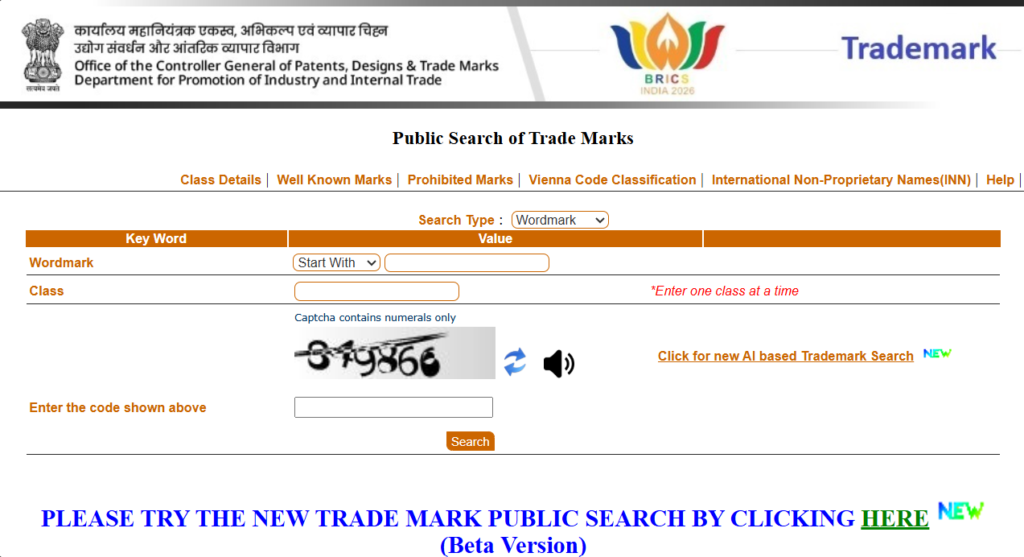
- Open your browser and go to the official Trademark search portal: tmrsearch.ipindia.gov.in (this is the authorised public search tool run by the Indian Trade Marks Registry — never use random third-party sites to “check” trademark availability, always rely on this official database).
- On the search page, you will see a search bar along with filter options such as “Word Mark,” “Vienna Code” (used for logo/image-based marks), “Phonetic,” and “Class.”
- Select the search type as “Wordmark” if you’re checking a brand name, or use the appropriate option for logo-based searches.
- Type in your proposed brand name exactly as you want to register it.
- Select the class number that matches your business (more on how to choose this below). You can also search “All Classes” to get a broader picture.
- Click on “Search”, and the portal will show you a list of all trademarks — registered, pending, opposed, or abandoned — that match or are similar to your search term in that class.
What to Look For in the Results
Don’t just check for an exact match. Trademark law also considers names that “sound similar” or “look similar” — this is called a phonetic or deceptive similarity check. For example, if you want to register “Zentro,” you should also check for “Zentro,” “Zentra,” “Zentro,” “Sentro,” and similar-sounding variations. If you find an identical or very similar mark already registered in your class, it’s safer to either modify your brand name slightly or choose a completely different name before filing.
If your search comes back clean — meaning no identical or confusingly similar marks exist in your class — you’re good to move to the next step.
Step 2: Choosing the Right Trademark Class
India follows the NICE Classification system, which divides all goods and services into 45 classes. Classes 1 to 34 cover physical goods (like cosmetics, clothing, electronics, food products, machinery, etc.), and classes 35 to 45 cover services (like advertising, education, IT services, restaurants, legal services, etc.).
Choosing the correct class is extremely important because your trademark protection only applies to the class(es) you register under. For example, if you register your brand name only under Class 25 (clothing), but a few years later you start selling footwear separately, you may not have protection for footwear unless that’s also covered under the same class or you file a separate application for it.
A few common examples to give you an idea:
- Class 3 – Cosmetics, perfumes, soaps, cleaning products
- Class 9 – Computer software, mobile apps, electronic devices
- Class 25 – Clothing, footwear, headgear
- Class 29/30 – Food products (Class 29 for meat, dairy, oils; Class 30 for bakery, tea, coffee, spices)
- Class 35 – Advertising, business management, retail and online selling services
- Class 41 – Education, training, entertainment services
- Class 42 – IT services, software development, SaaS platforms
- Class 43 – Restaurants, cafes, hotel and accommodation services
If you’re not sure which class fits your business, the IP India search portal also allows you to search by keyword to see which class similar businesses have registered under. It’s always better to be specific in your “description of goods/services” rather than writing vague terms like “all goods” — vague descriptions often lead to objections from the examiner.
If your business covers multiple categories (for example, you manufacture a product AND sell it online AND run a related service), you may need to register under more than one class, and you’ll pay the government fee separately for each class.
Step 3: Documents Required for Trademark Registration (Based on Business Type)
The documents required for trademark registration vary slightly depending on whether you’re applying as an individual, sole proprietorship, partnership firm, LLP, or private limited company. Let’s go through each one in detail.
Documents for an Individual Applicant
- PAN card and Aadhaar card (identity and address proof)
- A clear digital image/logo of the trademark in JPEG format (minimum size 8cm x 8cm, with a resolution of at least 200 x 200 pixels)
- Signed Form TM-48 (Power of Attorney/authorisation), only if you’re filing through a trademark agent or attorney rather than yourself
- User Affidavit and supporting proof of first use (invoices, packaging, website screenshots, social media posts with dates), only if you’re claiming that the brand is already in use and want to mention a “date of first use” instead of “proposed to be used”
Documents for a Sole Proprietorship Firm
- PAN card of the proprietor
- Aadhaar card or any government ID of the proprietor
- GST registration certificate (if available) or Udyam/MSME registration certificate of the firm
- Logo/wordmark image in JPEG format
- Address proof of the business (utility bill, rent agreement, etc.)
- Signed Form TM-48 (if filed through an agent)
- Proof of use, if applicable (similar to individual applicants)
A sole proprietorship is treated very similarly to an individual applicant since legally, the proprietor and the business are the same entity — so the application is filed in the proprietor’s personal name, with the business name mentioned as the trading style.
Documents for a Partnership Firm
- Copy of the Partnership Deed
- PAN card of the partnership firm
- PAN and Aadhaar cards of all partners (or at least the authorised partner who is signing the application)
- GST registration certificate (if available)
- Udyam/MSME certificate (if applicable, for fee benefit)
- Logo/wordmark image in JPEG format
- Authorisation letter signed by all partners, authorising one partner to sign and file the trademark application on behalf of the firm
- Signed Form TM-48 (if filed through an agent)
Documents for an LLP (Limited Liability Partnership)
- LLP Incorporation Certificate (issued by MCA)
- LLP Agreement
- PAN card of the LLP
- Aadhaar/PAN of the designated partner who will sign the application
- Board Resolution or authorisation letter from the LLP authorising a designated partner to apply for trademark registration on behalf of the LLP
- Udyam/MSME certificate (if applicable)
- Logo/wordmark image in JPEG format
- Signed Form TM-48 (if filed through an agent)
Documents for a Private Limited Company / Public Limited Company
- Certificate of Incorporation (issued by MCA)
- PAN card of the company
- Memorandum of Association (MoA) and Articles of Association (AoA), if requested
- Board Resolution authorising a director to sign and file the trademark application on behalf of the company
- PAN/Aadhaar of the authorised director/signatory
- Udyam/MSME certificate (if the company qualifies, to avail the lower fee slab — though most private limited companies fall under the higher fee category unless registered as a small enterprise under Udyam)
- Logo/wordmark image in JPEG format
- Signed Form TM-48 (if filed through an agent)
A Quick Note on Address Proof
For all entity types, the address mentioned on Form TM-A must match the address on your official registration documents — for companies and LLPs, this should match your MCA registered office address, and ideally your GST registration address too. Any mismatch can lead to objections during examination, so double-check this before filing.
Step 4: What Is DSC and Why Do You Need It for Trademark Filing
DSC stands for Digital Signature Certificate. It is essentially a digital version of your physical signature, stored in an encrypted USB token (or sometimes as a software-based certificate), and it is used to electronically sign documents on government portals.
For trademark e-filing in India, a Class 3 DSC (Signing + Encryption type) is mandatory if you want to create an account and sign Form TM-A yourself on the IP India e-filing portal.
Why DSC Is Needed
- To create your account on the IP India e-filing portal — without a valid DSC, you cannot complete the new user registration process.
- To digitally sign Form TM-A before final submission — this acts as your legal signature confirming that the details in the application are true and submitted by you (or your authorised representative).
How to Get a DSC
A DSC can only be issued by licensed Certifying Authorities (CAs) approved by the Controller of Certifying Authorities (CCA), Government of India — common providers include eMudhra, Capricorn, and similar authorised agencies. You’ll need to submit your PAN, Aadhaar, a passport-size photo, and a video verification (in most cases) to get the DSC issued. The cost of a DSC typically ranges between ₹1,000 to ₹2,000 for a validity of 2 years, and it needs to be renewed once it expires.
Important: The IP India portal itself displays an advisory that all e-filing users should subscribe to e-Sign only through the official e-Mudhra sign-up link provided on the IPINDIA portal, and not through any general third-party e-sign website, since that can lead to subscribing to a plan that isn’t aligned with IP India’s requirements.
If you’re filing through a trademark attorney or agent, they will usually use their own DSC to sign the application on your behalf (after you authorise them via Form TM-48), so in that case, you may not need to purchase a DSC yourself.
Step 5: Creating an Account on the IP India e-Filing Portal
Once your trademark search is clear, your class is finalised, your documents are ready, and you have your DSC (or your authorised signatory has one), the next step is to create your account on the official IP India e-filing portal.
Here’s exactly how to do it:
- Open your browser and go to ipindiaonline.gov.in, which is the official website of the Office of the Controller General of Patents, Designs and Trademarks (CGPDTM).
- On the homepage, you will see separate sections/links for Patents, Designs, Trademarks, GI, and Copyright. Click on the “Trademark e-Filing” link.
- On the Trademark e-Filing page, look for the “New User / Sign Up” option. Click on it to start the registration process.
- You will be asked to select the “Type of Applicant” — choose from:
- Proprietor – select this if you’re an individual, sole proprietor, partnership firm, LLP, or company applying directly (not through a lawyer/agent)
- Attorney – select this if you’re a registered trademark attorney filing on behalf of a client
- Agent – select this if you’re a registered trademark agent filing on behalf of a client
For most individuals and businesses filing on their own, “Proprietor” is the correct option. 5. Fill in your basic details — name, email ID, mobile number, and address — exactly as they appear on your DSC and supporting documents (any mismatch here can cause errors later). 6. The system will prompt you to connect your DSC token (plug in the USB token if it’s a hardware DSC, or use the e-Sign option if it’s e-Sign based). Follow the on-screen instructions to verify and link your DSC to the account. 7. Once your DSC is verified, set up your Login ID and Password. Make sure to save these credentials securely, as you’ll need them for all future filings, replies to objections, and status tracking. 8. After successful registration, you’ll receive a confirmation, and you can now log in to your dashboard using your Login ID, Password, and DSC.
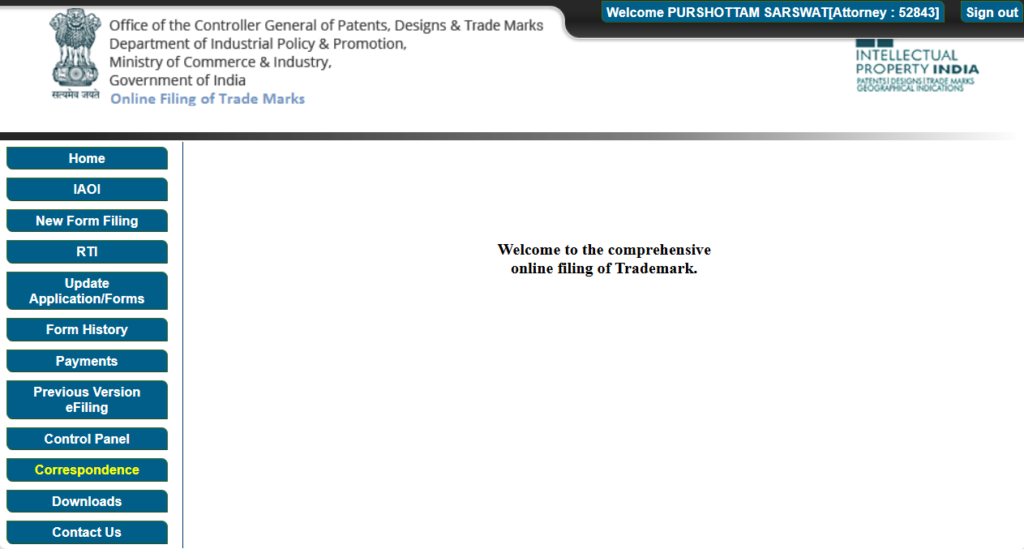
Step 6: Filing Form TM-A Online (The Actual Application)
Once you’re logged in, here’s how the actual filing process works:
- From your dashboard, go to “New Form Filing” or “e-Filing for Trademark” section.
- Select Form TM-A — this is the standard application form used for filing a new trademark application (it has replaced the older multiple forms like TM-1, TM-2, TM-3, etc. into a single consolidated form).
- Choose whether you’re filing as an individual/start-up/small enterprise (to apply the ₹4,500 fee) or as a regular company/other entity (₹9,000 fee). This is where uploading your MSME/Udyam certificate or Startup India recognition certificate becomes important — without it, the system may charge you the higher fee even if you’re a small business.
- Enter the applicant details — name, type of entity (individual, proprietorship, partnership, LLP, company, etc.), and address (must match your supporting documents).
- Select the class(es) you identified in Step 2.
- Upload the trademark image (your logo or wordmark) in the prescribed format and size. If it’s purely a word/name with no design, you can apply for a “word mark” without uploading a logo.
- Fill in the “Description of Goods/Services” — be as specific as possible. Avoid generic terms like “all goods” or “miscellaneous services,” and instead use standard terminology from the NICE Classification list (the portal usually provides a searchable list of accepted descriptions).
- Choose the “Date of First Use”:
- If you have already been using this brand name/logo in your business, select the actual date you started using it, and you’ll need to upload a User Affidavit along with supporting proof (invoices, packaging photos, marketing material, website screenshots with dates, etc.).
- If you haven’t started using it yet, select “Proposed to be Used” — this is very common for new businesses and doesn’t require any proof of use.
- Upload all supporting documents — identity proof, address proof, MSME/Udyam certificate, authorisation letter or board resolution (for partnership/LLP/company), and Form TM-48 (if an agent is filing for you).
- Review the entire application carefully — once submitted, corrections can be difficult and may require additional procedures.
- Proceed to payment. The portal supports net banking, debit/credit card, and UPI for fee payment.
- After successful payment, digitally sign the application using your DSC.
- On successful submission, the system will instantly generate an Application Number along with an acknowledgement/receipt — save this number, as it’s your reference for tracking the status of your application going forward.
Step 7: What Happens After You File — Examination, Journal Publication, and Opposition
Filing the application is just the beginning. Here’s what happens afterward:
1. Examination
The Trademark Registry examines your application to check whether it meets all legal requirements under the Trade Marks Act, 1999. The examiner checks for two types of issues:
- Absolute grounds – the mark is too generic, descriptive, or misleading (for example, trying to trademark the word “Software” for a software company would likely be refused on these grounds)
- Relative grounds – the mark is identical or confusingly similar to an already registered or pending trademark in the same class
If the examiner finds any issue, they issue an Examination Report, and you (or your attorney) get one month (30 days) to respond with a proper reply, addressing each objection raised.
2. Journal Publication
If your application clears examination (either directly, or after a successful reply to objections, sometimes followed by a hearing), the trademark is published in the Trademark Journal — an official weekly publication listing all trademarks that have been accepted for registration.
3. Opposition Period
Once published, there is a four-month window during which any third party who believes your trademark conflicts with their existing rights can file an opposition against your application. If no opposition is filed within this period, your application moves toward registration.
4. Registration Certificate
If there’s no opposition (or if an opposition is filed but resolved in your favour), the Registry issues the Registration Certificate, and your trademark is officially registered.
When Do You Get to Use ™ (TM) and When Do You Get to Use ® (R)?
This is one of the most commonly asked questions, so let’s break it down clearly.
The ™ (TM) Symbol
The moment you file your trademark application (i.e., as soon as you get your application number after submitting Form TM-A), you can start using the ™ symbol next to your brand name or logo. The ™ symbol simply signals to the public that you are claiming rights over that brand name — it does not mean the trademark is registered yet, but it does show that you’ve taken the first legal step toward protecting it.
You can continue using ™ throughout the examination, publication, and opposition stages — basically, from the day you file until the day you get your registration certificate.
The ® (R) Symbol
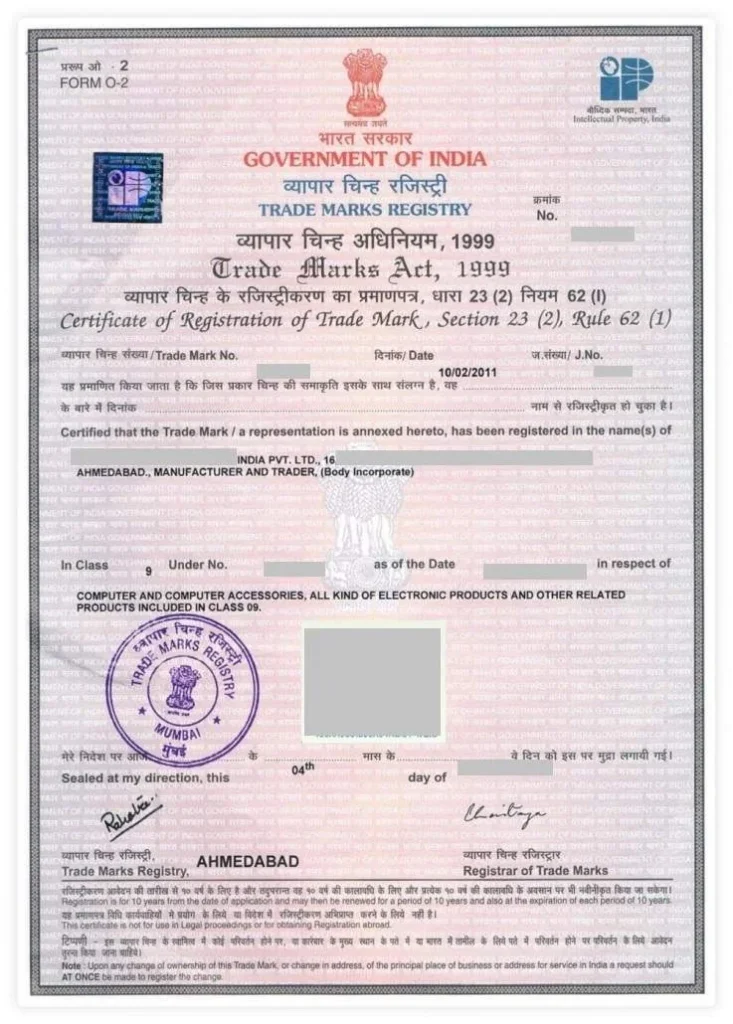
The ® symbol can only be used once the Trademark Registry issues the official Registration Certificate — meaning your application has cleared examination, completed the journal publication and opposition period (without any opposition, or with opposition successfully resolved in your favour), and has been formally registered.
Using the ® symbol before your trademark is actually registered is not just misleading — it can also create legal problems for you, so it’s important to wait for the official certificate before switching from ™ to ®.
How Long Does the Whole Process Take?
If everything goes smoothly with no objections or oppositions, the entire process — from filing to receiving the registration certificate — can take anywhere from 8 months to over a year, sometimes longer depending on the Registry’s workload and whether any objections or oppositions arise.
Validity and Renewal
Once registered, a trademark is valid for 10 years from the date of filing, and it can be renewed indefinitely for further periods of 10 years each, as long as you keep filing the renewal application and paying the renewal fee before expiry.
MSME Registration and Its Benefit in Trademark Filing
If you run a small business, getting Udyam (MSME) registration before applying for your trademark can directly reduce your government filing fee from ₹9,000 to ₹4,500 per class — effectively cutting your cost in half.
MSME/Udyam registration itself is a simple, free process done on the Udyam Registration portal using your Aadhaar and PAN details, and it usually takes just a few minutes to get your Udyam certificate. Once you have this certificate, you simply upload it during the trademark application process under the “Startup/Individual/Small Enterprise” category to avail the reduced fee.
This is one of the easiest ways for small business owners, freelancers, and startups to save money on trademark registration — and it’s often overlooked simply because people don’t realise the connection between MSME registration and trademark fees.
Benefits of Registering Your Trademark
Here’s why going through this entire process is worth it for your business:
- Exclusive ownership rights – You become the legal owner of the brand name/logo for your registered class, and no one else can legally use an identical or deceptively similar mark for similar goods/services.
- Legal protection against infringement – If someone copies your brand, you can send legal notices and file infringement suits in court, backed by your registration certificate as proof of ownership.
- Builds brand value and trust – A registered trademark adds credibility to your business in the eyes of customers, investors, and partners.
- Asset for your business – A registered trademark is an intangible asset that can be licensed, franchised, or even sold/transferred, adding real monetary value to your business.
- Nationwide protection – Once registered, your trademark rights are protected across India, not just in your local area.
- Helps in online marketplace protection – Many e-commerce platforms (like Amazon and Flipkart) have brand registry programs that require a registered trademark to protect your listings from counterfeit sellers.
- Foundation for international filing – If you plan to expand abroad, having a registered trademark in India strengthens your application under international treaties like the Madrid Protocol.
Common Mistakes to Avoid During Trademark Registration
- Skipping the trademark search before filing, leading to objections or oppositions later
- Choosing the wrong or overly broad class/description for your goods/services
- Mismatched address details between Form TM-A and your business registration documents (GST, MCA, etc.)
- Uploading a low-resolution or unclear logo image
- Not having an authorisation letter/board resolution ready for partnership, LLP, or company applications
- Forgetting to claim MSME/startup benefits and ending up paying double the government fee
- Missing the 30-day deadline to respond to an examination report
- Not tracking the application status regularly, and missing the 4-month opposition window
Frequently Asked Questions (FAQs)
1. How much does trademark registration cost in India? For individuals, startups, and MSMEs, the government fee for online filing is ₹4,500 per class. For companies and other entities that don’t qualify for the lower slab, it’s ₹9,000 per class. Professional fees, if you hire an attorney or filing agency, are charged separately on top of this.
2. Can an individual apply for trademark registration without forming a company? Yes. Any individual can apply for a trademark registration in their personal name as a “Proprietor” and become the registered owner once approved — there’s no requirement to first register a company or firm.
3. What is DSC, and is it mandatory for trademark registration? DSC stands for Digital Signature Certificate — a digital equivalent of your handwritten signature, issued by licensed certifying authorities. It is mandatory to create your account on the IP India e-filing portal and to digitally sign Form TM-A. If you’re filing through an attorney or agent, they may use their own DSC on your behalf.
4. What is the role of MSME (Udyam) registration in trademark filing? If your business has a valid MSME/Udyam registration certificate, you qualify for the reduced government fee of ₹4,500 per class instead of ₹9,000, while filing online. You simply upload your Udyam certificate during the application process to avail this benefit.
5. How do I check if my brand name is already trademarked? You can check this for free on the official IP India public search portal at tmrsearch.ipindia.gov.in. Search using the “Wordmark” option, select your relevant class, and review the results for identical or similar marks.
6. When can I start using the ™ symbol? You can start using the ™ symbol as soon as you’ve filed your trademark application and received an application number — even before the trademark is officially registered.
7. When can I use the ® symbol? Only after the Trademark Registry issues your official Registration Certificate. Using ® before that is not allowed and can create legal issues.
8. How long is a registered trademark valid? A registered trademark is valid for 10 years from the date of filing and can be renewed indefinitely for further periods of 10 years each.
9. What documents are needed for an LLP or Private Limited Company to register a trademark? For an LLP, you’ll need the LLP Incorporation Certificate, LLP Agreement, PAN of the LLP, and an authorisation letter/resolution from the designated partners. For a Private Limited Company, you’ll need the Certificate of Incorporation, company PAN, and a Board Resolution authorising a director to sign and file the application — along with identity proof of the authorised signatory in both cases.
10. How long does the trademark registration process take? If there are no objections or oppositions, the process from filing to getting the registration certificate typically takes around 8 months to a year or more, depending on the Registry’s processing time.
Final Thoughts
Trademark registration may seem like a long process with a lot of steps, but once you break it down — search, choose the right class, gather documents, get your DSC ready, file Form TM-A, and track your application — it becomes a fairly manageable task, whether you’re an individual, a proprietorship, a partnership firm, an LLP, or a private limited company.
The earlier you register your brand name, the better protected your business identity is from copycats and competitors. And with benefits like the reduced ₹4,500 fee for MSME-registered businesses, there’s really no reason to delay this important step for your brand.
Also Read :- Trademark Registration Cost in India (2026) – Complete Fees Breakdown
How to Register Trademark in India for Amazon Sellers (Complete Guide)
How to Check Trademark Availability Before Filing (Free Tools & Tips)